Professional invoices with your logo, NTN and amount in words
A neat invoice gets you paid faster. Set up your logo, numbering, tax, terms and bank details once, and every BIZBEAT invoice prints perfectly.
Read the article
A customer walks in, buys two bottles of oil and pays in cash. An hour later a shopkeeper from the next bazaar takes 20 cartons and says he'll pay next week. Both are sales. But if you record them the same way, your books will be wrong by evening.
BIZBEAT gives you two kinds of sale for exactly this reason.
Use a cash sale when the customer pays in full on the spot.
It's the counter sale: quick, and finished the moment you print the receipt.
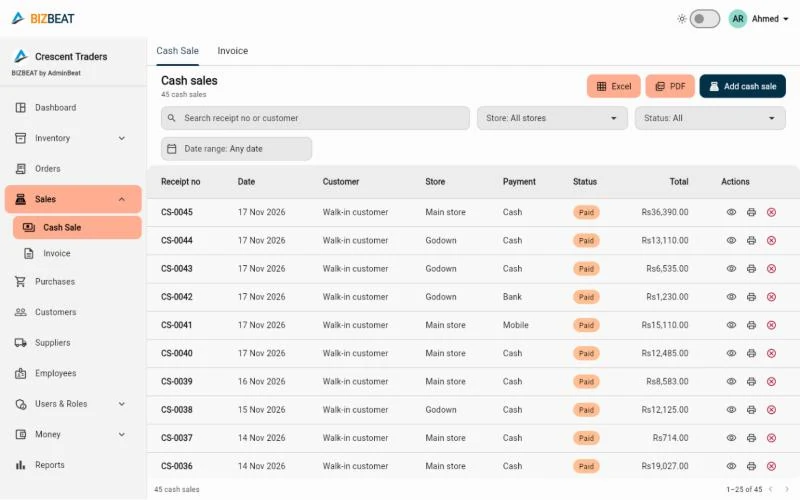
Use a credit invoice when a customer takes goods now and pays later, in part or in full.
This is how wholesale and distribution really work, and it's how you stop losing track of udhaar.
| Cash sale | Credit invoice | |
|---|---|---|
| When | Customer pays in full now | Customer pays later or in parts |
| Customer name | Optional | Required |
| Stock | Goes down | Goes down |
| Money | Into cash or bank at once | Into the customer's balance |
| Follow-up | None | Payments against the ledger |
| Printout | Receipt | Invoice with balance |
Create the credit invoice, then record the payment for the amount they gave you. The ledger shows the invoice, the payment and what is still due. No mental maths, no slip of paper.
Every line on a cash sale or credit invoice saves the cost of the item at that moment. That's why BIZBEAT can show you the real profit on each sale, even when your purchase prices keep changing. If you're curious how that cost is worked out, see weighted average cost, explained.
If a sale was entered wrongly, cancel it. The stock comes back and the money or balance is reversed, but the document stays in the history marked as cancelled. Nobody can make a sale quietly disappear.
BIZBEAT also protects you from the classic double save: if the internet hiccups and you press Save twice, you still get one invoice.
Yes. Each line can use the product's unit or any of its packs, for example 2 cartons on one line and 5 loose pieces on another.
Yes. Each line has a discount and tax, and your default tax rate is filled in for you from Settings.
Yes. In Settings → Printing choose A4, A5 or an 80 mm receipt. Your logo, address and footer text are printed automatically.
A cash sale. Use a credit invoice only when money will come later.


A neat invoice gets you paid faster. Set up your logo, numbering, tax, terms and bank details once, and every BIZBEAT invoice prints perfectly.
Read the article
Sales are not profit. Read a Profit & Loss report line by line with a simple shop example, and see what really makes you money.
Read the article
You checked October, filed the numbers, and then someone edits an old invoice. Period lock in BIZBEAT stops changes to closed months, so your books stay final.
Read the article