Read your Profit & Loss in 5 minutes (even if you hate accounting)
Sales are not profit. Read a Profit & Loss report line by line with a simple shop example, and see what really makes you money.
Read the article
Every shop has a few customers like this. They buy on credit every week, pay "something" at the end of the month, and after six months nobody is sure what the real balance is. The customer remembers a smaller number. You remember a bigger one. The register has three crossed-out totals.
That gap is money. In a busy wholesale business it can easily be lakhs.
A ledger (khata) is simply a running list, per customer, of:
In BIZBEAT you never write this list yourself. It builds itself from your invoices and payments, so it can't be wrong by a missed line.
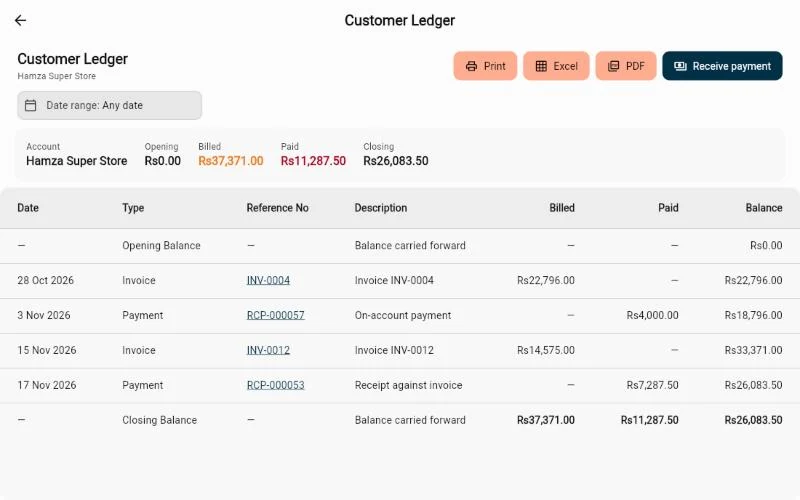
Bismillah Kiryana buys from you on credit:
| Date | Entry | Amount | Balance |
|---|---|---|---|
| 1 Nov | Opening balance | Rs 12,000 | |
| 4 Nov | Invoice INV-1031 | + Rs 18,500 | Rs 30,500 |
| 10 Nov | Payment received | − Rs 15,000 | Rs 15,500 |
| 17 Nov | Invoice INV-1058 | + Rs 9,200 | Rs 24,700 |
When the owner says "I paid you last week", you can open the ledger on your phone and show the Rs 15,000 payment on 10 November, and exactly what is still due.
Real customers rarely pay invoice by invoice. Some pay a round amount. Some pay before they buy.
No side notes, no "adjust next time" on a slip of paper.
Open the Customer Balances report to see everyone with an outstanding amount, largest first. It's the most useful five-minute list in your week: call the top five, and your cash flow changes.
The dashboard also shows your total receivables, so you always know how much of your money is sitting with customers.
The fastest way to end a dispute is a clear statement. From the customer's ledger, choose the date range and print or export it as PDF. Send it on WhatsApp before you call. Most customers simply pay once they see the dates and invoice numbers.
Yes. When you add a customer, enter their opening balance. From then on, BIZBEAT tracks every invoice and payment automatically.
Yes. If a customer pays more than they owe, the extra stays as their credit and is used against their next invoice.
Yes. Open the customer's ledger and pick any date range. You can print it or export it to send to the customer.
Yes. A cancelled invoice is reversed in the ledger, but it is never deleted, so the history stays complete.


Sales are not profit. Read a Profit & Loss report line by line with a simple shop example, and see what really makes you money.
Read the article
You checked October, filed the numbers, and then someone edits an old invoice. Period lock in BIZBEAT stops changes to closed months, so your books stay final.
Read the article
Check today's sales from home, create an invoice at a customer's shop, or approve an order on the road. One account works on your phone, tablet and laptop.
Read the article