Read your Profit & Loss in 5 minutes (even if you hate accounting)
Sales are not profit. Read a Profit & Loss report line by line with a simple shop example, and see what really makes you money.
Read the article
The moment a business grows beyond the owner, the same question comes up: how do I let staff work in the system without handing over everything? Profit margins, supplier rates and customer balances are not for everyone's eyes.
In BIZBEAT the answer is roles.
A role is a set of permissions, area by area: view, add, edit, cancel, export. Make one role per job, then give it to people.
| Role | What it can do | What it can't |
|---|---|---|
| Cashier | Cash sales, view stock | See costs and profit, cancel sales |
| Salesman | Invoices, customer list | Edit old invoices, view supplier rates |
| Store keeper | Stock, transfers, adjustments | Sales, money |
| Accountant | Payments, expenses, reports | Settings, staff |
| Order taker | His own orders | Other bookers' orders |
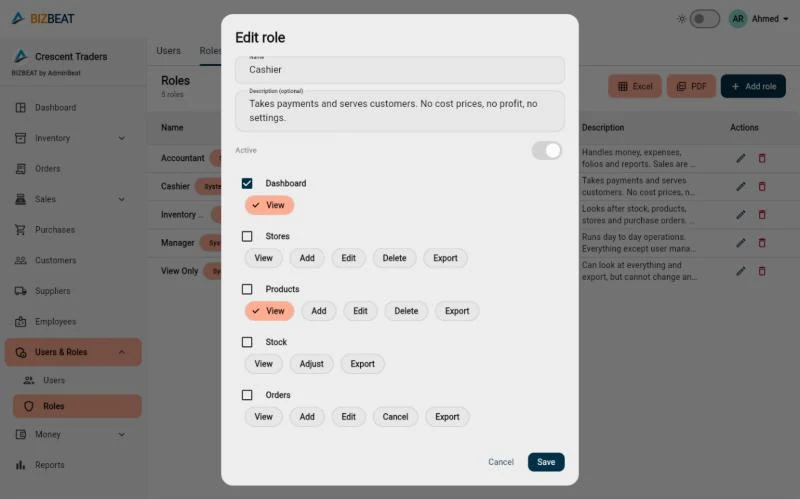
A cashier at the shop doesn't need the godown. Staff can be limited to the stores they work in, so they see and use only those.
A few permissions deserve extra thought:
Permissions in BIZBEAT are not just hidden buttons. Every action is checked on the server, so even a clever user can't reach what his role doesn't allow. And every important action is written to the activity log: who did it, and when.
Deactivate their user the same day. Their history stays, every invoice still shows who made it, but they can no longer sign in.
The number of staff accounts depends on your plan. Contact us if you need more.
They shouldn't. Each person gets their own login, so the activity log shows exactly who did what.
Yes. Change the role's permissions and everyone with that role gets the change at once.
Only if their role includes the reports and cost views. A cashier role can sell without ever seeing cost or profit.


Sales are not profit. Read a Profit & Loss report line by line with a simple shop example, and see what really makes you money.
Read the article
You checked October, filed the numbers, and then someone edits an old invoice. Period lock in BIZBEAT stops changes to closed months, so your books stay final.
Read the article
Check today's sales from home, create an invoice at a customer's shop, or approve an order on the road. One account works on your phone, tablet and laptop.
Read the article