Read your Profit & Loss in 5 minutes (even if you hate accounting)
Sales are not profit. Read a Profit & Loss report line by line with a simple shop example, and see what really makes you money.
Read the article
Buying is where many businesses quietly lose money. Not on price, but on mismatch: what you ordered, what arrived, and what the supplier billed are three different numbers, and nobody checks.
BIZBEAT splits buying into three clear steps, so each number is checked against the next.
A purchase order (PO) records what you are buying, from whom, and at what price:
Print or share it as a PDF with your logo, so the supplier has the order in writing. Creating a PO does not change your stock. Nothing has arrived yet.
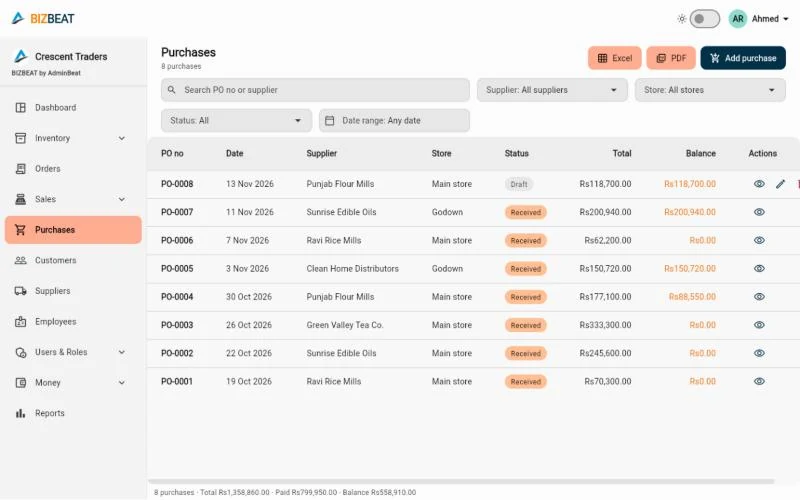
When the truck arrives, open the PO and record goods received. This is where the mismatch gets caught.
Only received goods enter your stock, in the store you chose. And your average cost updates at that moment, so your profit on the next sale is already right. (Here's how the average cost works.)
Received goods add to what you owe that supplier. When you pay, cash or bank, record a supplier payment and the balance drops.
The supplier's ledger shows every received purchase and every payment, so you always know the exact amount due. More on that in know exactly what you owe each supplier.
| Step | What happens | Stock | You owe |
|---|---|---|---|
| PO-0315 | 50 cartons of oil @ Rs 6,240 | no change | no change |
| Received | 46 cartons arrive | +552 bottles | + Rs 287,040 |
| Payment | Rs 200,000 by bank | no change | Rs 87,040 left |
Without the PO, you might have paid for 50 cartons. That's Rs 24,960 you would never have noticed.
Every purchase line keeps its cost snapshot. When prices change next month, your old purchases keep their real cost, and your profit reports stay accurate. You'll never again wonder why last month's profit changed on its own.
No. Stock increases only when you record goods received. The PO is just the order.
Yes. Receive what arrived today; the remaining quantity stays on the same purchase order until it arrives.
Yes. Choose the store on the purchase order, and received goods are added to that store's stock.
Cancel it. The stock and the supplier balance are reversed, and the cancelled purchase stays in the history.


Sales are not profit. Read a Profit & Loss report line by line with a simple shop example, and see what really makes you money.
Read the article
You checked October, filed the numbers, and then someone edits an old invoice. Period lock in BIZBEAT stops changes to closed months, so your books stay final.
Read the article
Check today's sales from home, create an invoice at a customer's shop, or approve an order on the road. One account works on your phone, tablet and laptop.
Read the article